
What an earnings call is
A few days after a company reports its quarter, its management holds a conference call. An hour, sometimes more. They walk through the numbers, explain what went right and wrong, and then analysts ask questions.
The result tells you what happened. The call tells you why, and what comes next. Whether the margin drop was a one-off. Whether the order book is filling. What the company expects for the year. That is the part of the quarter that moves a stock for months, not just a morning.
A written transcript of every call is filed with the exchange. It runs to twenty or thirty pages.
The problem with reading them
There are over a thousand calls a quarter. Nobody attends more than a handful, and nobody reads thirty pages for a company they might buy.
So the call becomes the part of the quarter most investors skip. Even for companies they own. The management guidance, the analyst who pushed back and got a weak answer, the commitment that quietly did not repeat from last quarter, all of it stays inside a PDF nobody opened.
Concall Scans reads every call and writes the notes. Within about an hour of the call ending, the summary is up, and it sits in a table with every other call this quarter.
Reading the table
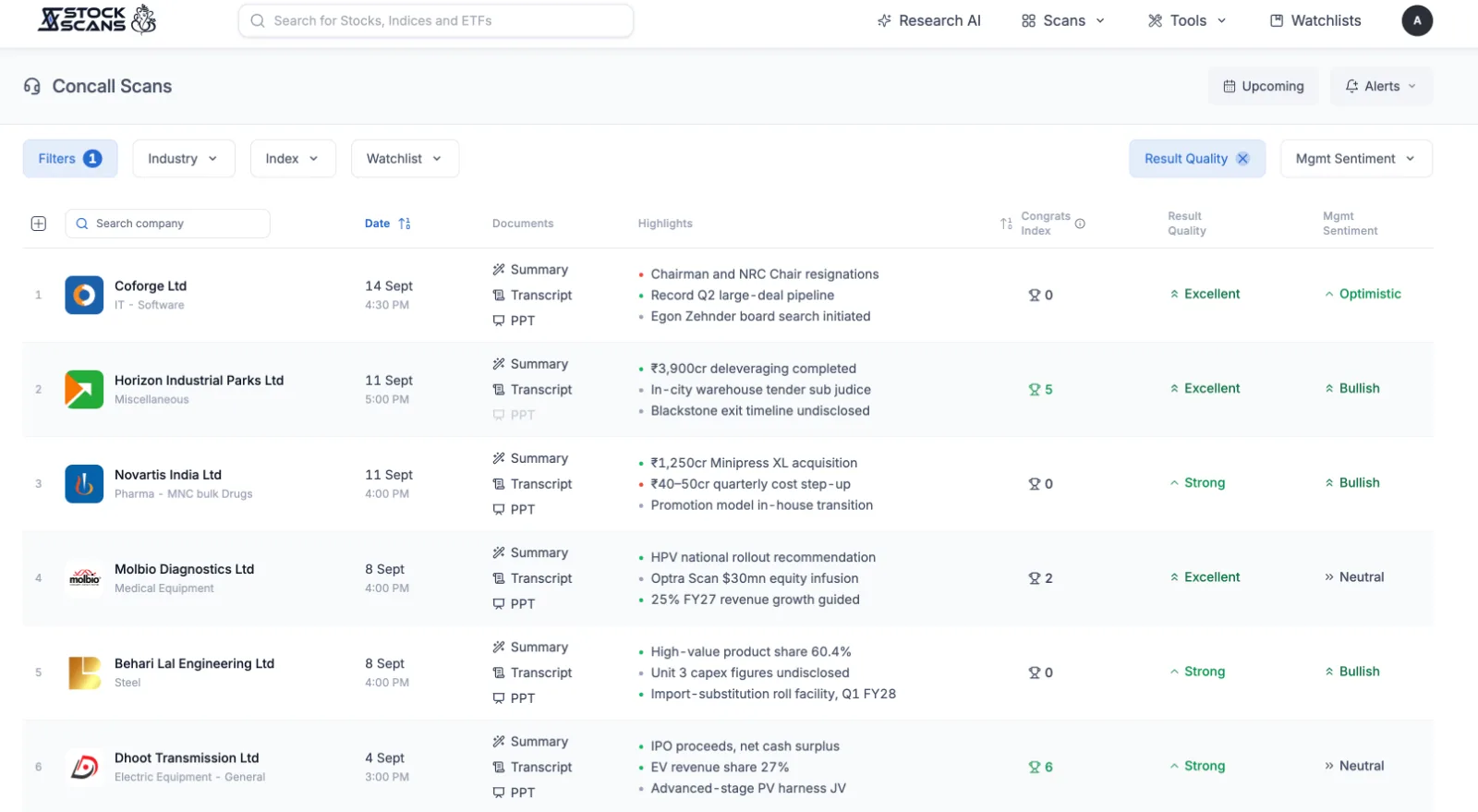
Open Scans in the top menu and choose Concall Scans. Each row is one call, newest first.
Highlights are three short lines that say what the call was about. A green dot is good news, a red dot is bad, grey is neutral. You can scan fifty calls in a minute this way.
Mgmt Sentiment is management's tone about the road ahead, read from what they said: Bullish, Optimistic, Neutral, Cautious or Bearish. Not what they reported, what they expect.
Result Quality scores the quarter's numbers against the same quarter a year ago, ranked among peers: Excellent, Strong, Average, Weak or Poor. It is computed from the figures, not from the words, so it is a useful check against a confident tone.
Congrats Index is the odd one. It counts how often analysts congratulated management on the call. Analysts are paid to be sceptical, so when several of them open with a compliment, the quarter usually earned it. Five or more is where it gets interesting.
The Documents column has three links: Summary opens the notes, Transcript opens the full filed PDF, PPT opens the investor presentation.
The summary
Click Summary on any row. This is the page that replaces the hour.
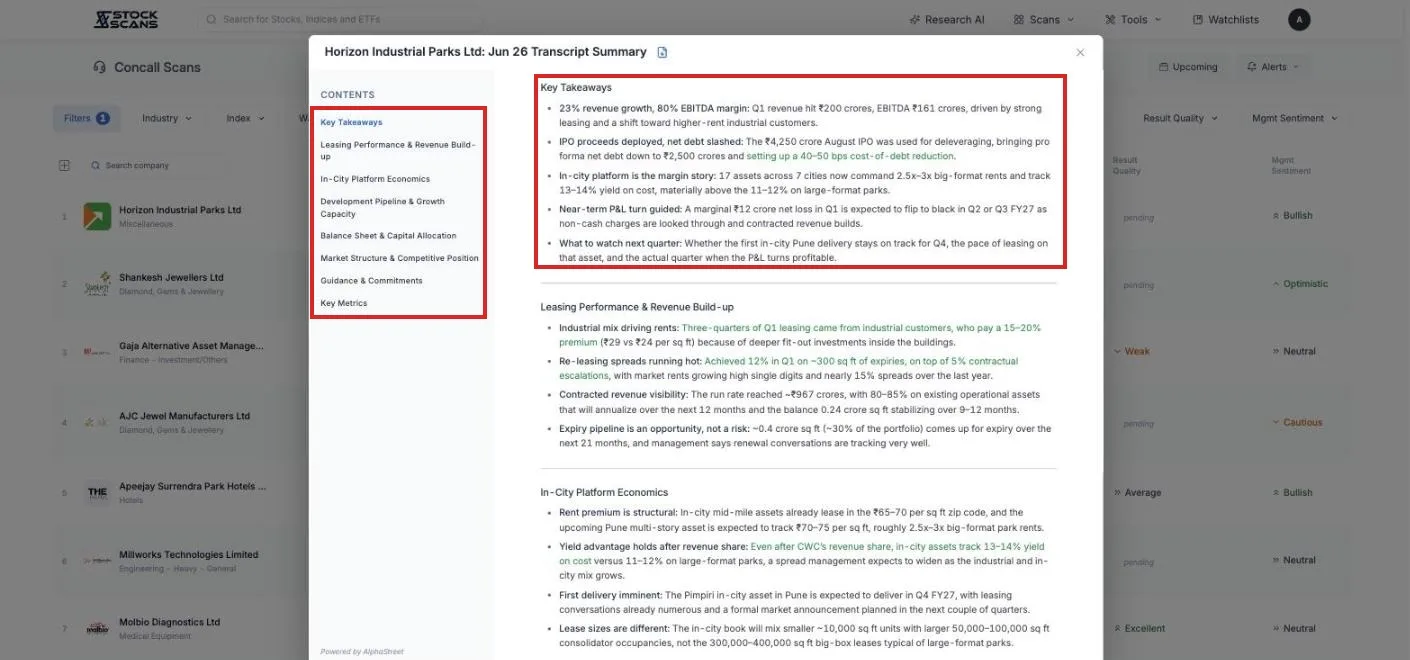
It always opens with Key Takeaways: five bullets, the verdict of the call, and the last one is always what to watch next quarter.
Then five to seven sections named for what this particular call was about. Demand. Margins. Order book. Capex. A new plant. The names change from company to company because the calls do.
Near the end sit two tables. Guidance & Commitments lists only the promises that can be checked later: a specific, a number, a timeline. Vague optimism does not get a row. Key Metrics collects the figures management quoted.
Positive statements are tinted green and negative ones red, so the balance of a call shows before you read a word. And every bullet ends with a page number in brackets. Click it and the transcript opens at that page with the sentence highlighted. Nothing in the notes has to be taken on trust.
Who is on a call today, and who is next
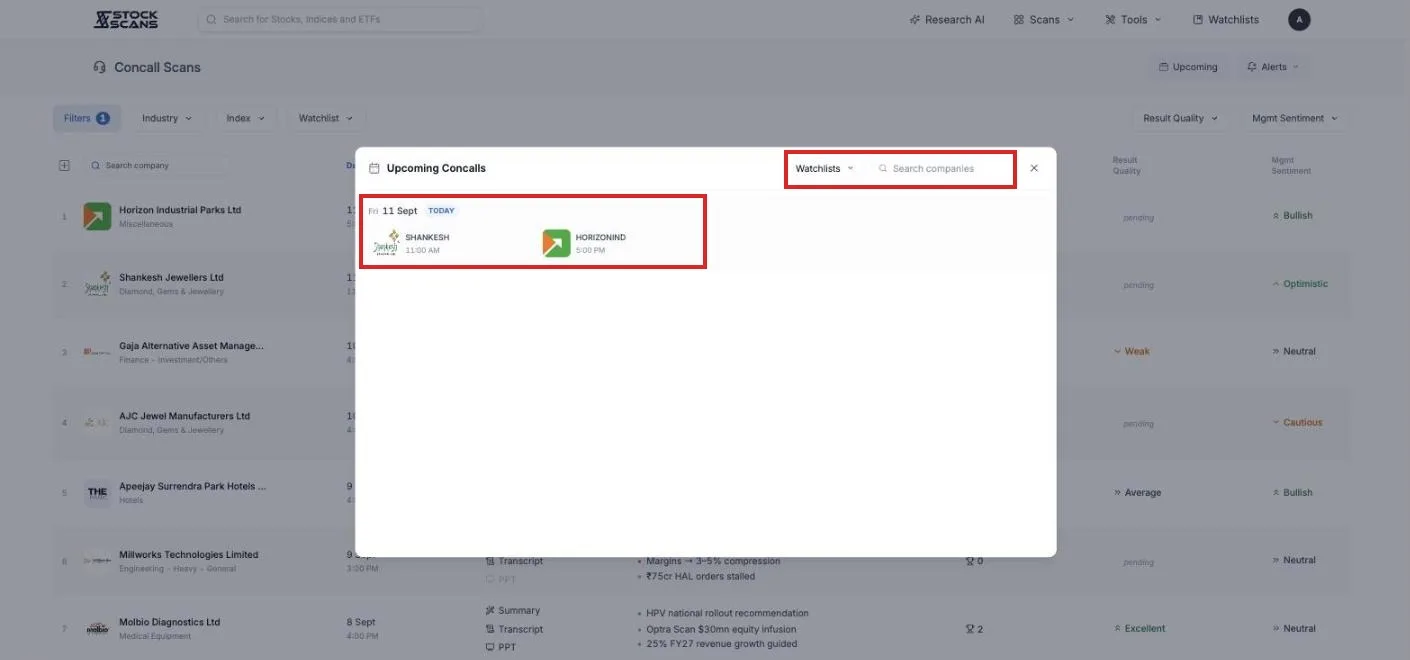
Above the table, on days with calls, a strip called Today's calls shows what is scheduled, with a marker while a call is on and a note when the transcript is on its way. When the notes land, the call moves from the strip into the table.
The Upcoming button opens the next sixty days of scheduled calls, day by day, with a watchlist filter so you can see only yours.
Narrowing the table
Industry, Index and Watchlist limit the rows to companies you follow. Result Quality and Mgmt Sentiment are filters too, so "Excellent quarter but Cautious management" is two clicks, and a worthwhile list to read. Filters opens the same condition builder as a stock scan, starting with a market cap floor of 100 crore.
Click Date to flip between newest and oldest. Click Congrats Index to sort by the most congratulated calls.
Getting the takeaways sent to you
Press the Alerts bell and pick a watchlist. From then on, when any company in it finishes its call, the five key takeaways arrive by email or Telegram, with the sentiment and result quality attached. Usually within an hour of the call ending. You read the notes on your phone before the market has finished reacting.
What is free
The table. Every call this quarter, with highlights, sentiment and result quality.
Transcripts and presentations. The filed PDFs, open to anyone.
Today's calls and Upcoming. The calendar, with the watchlist filter.
Summaries on the company page. Open any company's page and its call summaries are free to read, no limit.
Ten summaries a month from this table with a free account.
Premium raises the summaries to forty a month and unlocks the Congrats Index column. Premium Plus makes summaries effectively unlimited.
Three habits worth forming
Your own companies, the day they speak. Alerts on for your watchlist. Read the takeaways, then open the summary and go straight to Guidance & Commitments. Keep it. Next quarter, check what they said against what they did.
The mismatch list. Result Quality set to Excellent, Mgmt Sentiment set to Cautious. Companies that just had a great quarter and are warning you anyway. Worth understanding why.
The compliment list. Sort by Congrats Index. Five or more, and a company you have never heard of. Open the summary.
The calls will keep happening whether you listen or not. Now you can read them.
Comments